

AI help desk software automates tasks such as answering common questions, routing tickets, and assisting agents with suggested responses. Businesses use it to improve efficiency, lower support costs, and deliver a better overall customer experience.
We reviewed the top 13 AI help desks, including Zendesk Support Suite and Tidio. See their AI features, pros, and cons:
Top 13 AI help desk software
Insights come from our experience with these solutions and from other users’ experiences shared on Capterra.
Zendesk Support Suite
Zendesk Support Suite is a customer support and help desk software. It provides live chat, phone support, self-service features, and ticketing tools.
Zendesk Support Suite offers all-in-one plans starting at $55/agent/month.
However, these all-in-one plans include high-level features as standard. AI agents, online support from the Zendesk team, triggers & automation, and predefined responses are available in starter plans.
Thus, mid-size companies can find all the features needed to manage mid-scale customer interactions with analytics and automation.
Small businesses that do not require extensive analytics can opt for the pay-as-you-go option beginning at $19 per agent/month.
Zendesk Support Suite AI features
Conversation bots: You may utilize a bot builder to create answers for your chatbots, allowing your customers to self-serve their support questions.
Bot personas: Apply a personality to a chatbot’s AI-generated responses. You can optionally specify up to 20 personas, including:
- Professional, pleasant, and direct voice.
- Friendly, relaxed, and approachable voice.
- Playful, lighthearted, and appealing voice.
Autoreplies with articles: Suggest relevant help center articles in response to inquiries made via email, web form, API, or Web. This entails suggesting articles in ticket responses and recommending products.
Intent suggestions: Zendesk AI studies previous bot conversation data to identify popular subjects that customers ask about but do not have existing bot responses and link them to answers.
Intent suggestions & rule-based AI answers: Bot builders allow you to create customized, predefined responses to questions. For example, for questions about “international costs,” users can create a predefined bot answer starting with “Thank you for your question!”
AI features based on subscription plans
Pros
- AI-powered macros: Reviewers report that the product effectively auto-filled messages.
- Automated actions: Automated ticket closing and answers work effectively.
- Collaboration: Users say Zendesk Support Suites established more visible communication rules for CC contacts. This streamlined the communication with customers and stakeholders
Cons
- Complex AI features: Zendesk Support Suite has complex features such as skill-based ticket routing and real-time analytics.
- Billing: Customers say there are several “features” they don’t use and must pay for. Better billing options would be an improvement.
- Two-way sync integrations: Zendesk only syncs one way with services like HubSpot. It would be beneficial if there were more support for synchronizing fields in both directions, as well as the ability to choose which data fields sync and in which direction, without the need for middleware such as Zapier.
- Ticket load times: Too many add-ons can substantially overload the system, resulting in long ticket load times.
Tidio
Tidio is a live chat and help desk platform for eCommerce users and Shopify store owners. Tidio offers two kinds of chatbot solutions: Tidio Flows and Lyro AI agent:
- Tidio Flows: Rule-based automated chatbots are ideal for scheduling appointments, generating leads, and creating structured customer journeys. These script-driven, deterministic bots follow predefined conversational paths.
- Tidio Lyro AI Agent: The Lyro AI Agent, driven by Claude from Anthropic and in-house models, can handle up to 70% of customer service inquiries. In contrast to conventional chatbots, Lyro is non-deterministic, able to comprehend context, pose clarifying queries, and perform intricate operations such as generating support tickets, processing refunds, and verifying order statuses.
Tidio also offers several integration options tailored to specific areas. Some of its examples are:
- E-commerce: Shopify, WordPress, WooCommerce, Adobe Commerce, Shopware
- CRM systems: HubSpot, Salesforce, Zendesk, Pipedrive, Agile CRM, Zoho CRM
- Email marketing: Klaviyo, Mailchimp
- Analytics: Google Tag Manager, Google Analytics
- Messaging platforms: Facebook Messenger, Instagram, WhatsApp
- Extended integrations: Zapier, OpenAPI, Tray.io
Tidio’s AI chatbot: Lyro
Automated ticket routing: Lyro only responds to emails automatically. If the question or case is too complex for Lyro, it routes the ticket to a human agent.
AI phrase matcher: Triggers when a visitor sends a message with a phrase or an intent that the chatbot can recognize.
For example, if a customer asks, “How can I get my money back?”, the chatbot recognizes that the intent closely matches a pre-defined scenario such as “how to process a return.” It then automatically triggers the appropriate response or workflow to handle the query effectively.
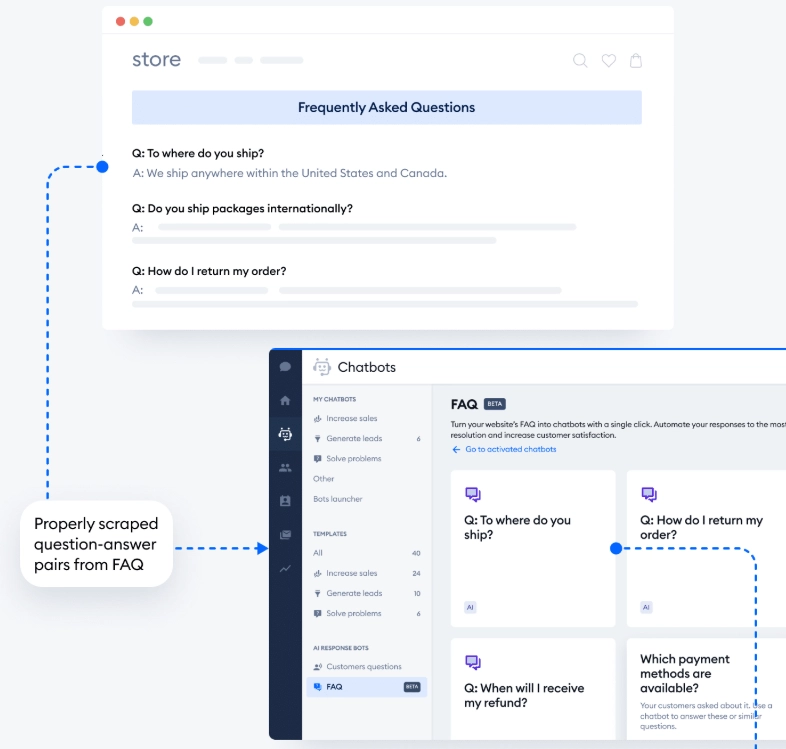
FAQ wizard: Scrapes question-answer pairs from your website and generates FAQ chatbots for each individual page.
Pros
- Dual architecture: Offers both rule-based workflows and advanced AI in one solution. Live chat and chatbot integrate real-time human support with automation to handle FAQs and decrease workload. The AI agent can also resolve complex customer support issues requiring an understanding of context.
- Email fallback: Missed chat messages are routed to email to ensure no customer is left unattended.
Cons
- Limited reporting: Insights on lead quality and conversion paths could be more detailed.
ninjaOne
NinjaOne is an IT management platform that provides automation features for ticketing, endpoint management, and support workflows. It focuses on automation rather than AI-driven, conversational help desk capabilities.
ninjaOne AI features
Ticket automation: NinjaOne’s ticketing system primarily relies on automation features to streamline IT support processes. Automation features include:
- Automated ticket routing: Routes tickets based on issue type or severity.
- Automated ticket creation: Generates tickets from system alerts.
- Response templates: Provides consistent, predefined replies to common issues.
- Event or time-based automation: Opens or closes tickets based on system events or schedules.
Pros
- Strong ticket automation & routing: NinjaOne supports multiple automation types (event-based, time-based, script rules) to assign and move tickets without manual intervention.
- Contextual remediation from within the ticket interface: You can execute endpoint fixes (scripts, remote access) directly from a ticket without switching tools.
- Unified platform with automation: Ticketing + patch management + documentation.
Cons
- Lack of conversational AI/natural language understanding.
Intercom
Intercom Helpdesk is a help desk and customer support platform that centralizes customer inquiries and team responses into a unified workspace.
Intercom AI features
AI assistant for support agents: An integrated AI helper that can answer questions, troubleshoot issues, and suggest next steps instantly inside the inbox.
Context-aware answers: It draws on multiple content sources (help center, internal articles, conversation history, public URLs, PDFs, macros, etc.) to generate tailored answers for the current case.
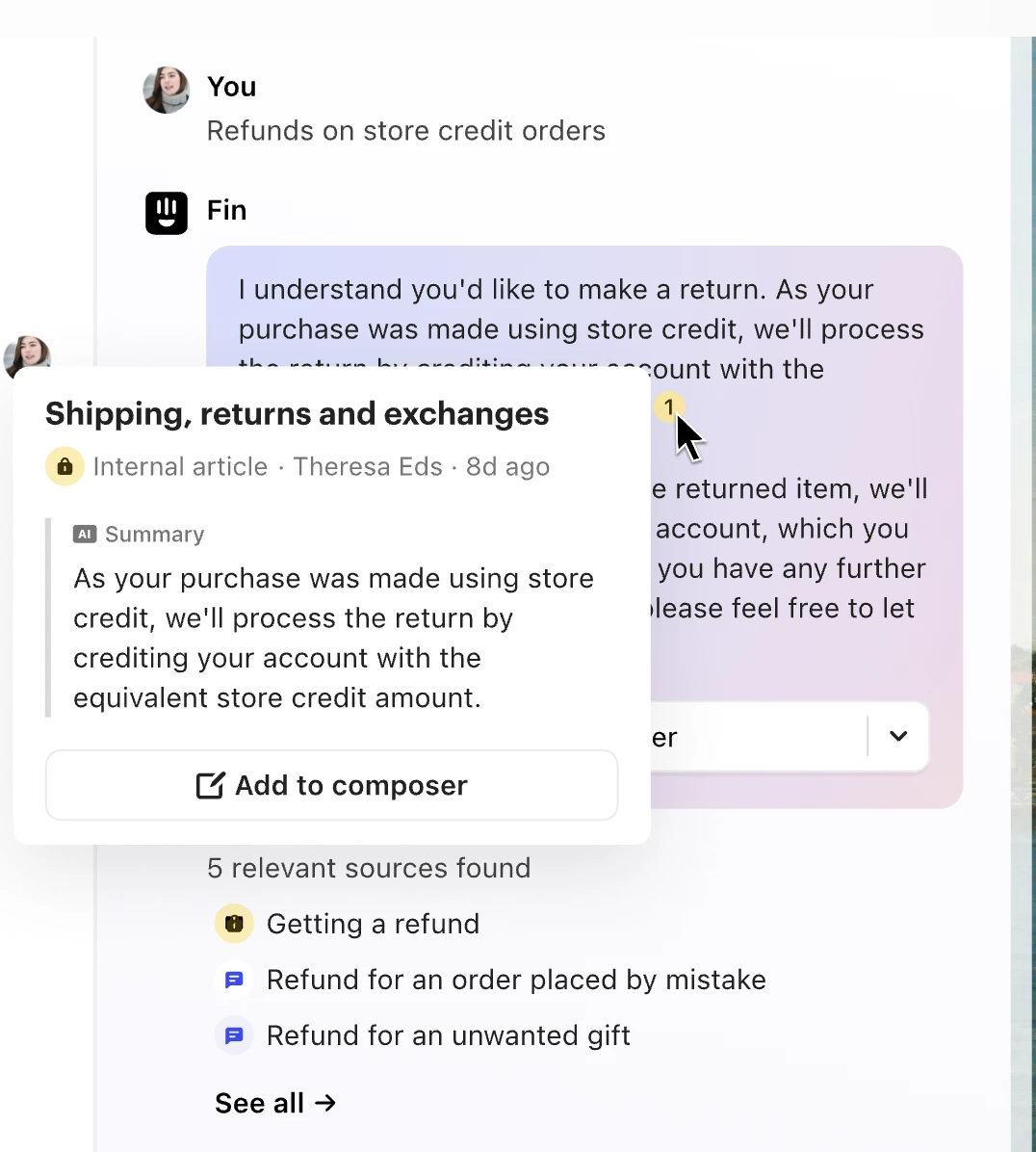
Source visibility and validation: When Copilot provides an answer, it shows the relevant sources used so agents can verify and browse them directly.
Training and onboarding support: Guide less experienced agents through internal processes and troubleshooting steps using existing support content.
Insights & reporting: Built-in dashboards to track Copilot usage and quality, helping optimize content and AI performance.
Freshdesk
Freshdesk is a customer support and help desk tool specializing in ticket management.
Freshdesk’s Freddy AI
Email bot: Freddy AI can be used as an email bot that automatically redirects incoming tickets to appropriate agents.
AI Copilot: Freddy AI may also serve as an AI copilot, assisting agents with their tasks. On the Admin page, users can select ‘Freddy’ to display a list of all Freddy features including:
- Ticket content assisting
- E-mail, solution article (i.e. FAQs) generator
- Canned response suggester
Thank you detector: Freddy AI can prevent ticket reopening based on responses such as ‘thank you’ and ‘out of office’. When a customer answers a ticket, agents will be notified via email. Agents can review the response to determine whether the ticket should be reopened.
Pros
- Thank you detector: Users appreciate Freshdesk’s ability to prevent “thank you” responses from reopening closed requests, reducing the need to re-close requests.
- AI canned responses: Users liked how Freshdesk suggested canned responses to tickets.
- Ticket submissions: Users like Freshdesk’s user-friendly and efficient ticket submission platform. Some have praised it as the greatest they’ve ever used, citing its clarity and practicality.
- Customer support: Customers say that sometimes support replies quickly and addresses the problem, while other times it lasts longer than expected to reach a support agent.
Cons
- Integrations for AI tools: Customers say there should be more integrations, such as Vonage AI, ChatGPT, and other AI tools.
- Freddy AI: Users claim chatbots are difficult to get used to. Creating a ticket following a custom flow requires API, and if you are not an IT member, you may find it challenging to change settings.
- Ticket duplicates: Customers sending the same emails to various Freshdesk addresses create duplicate tickets allocated to separate support teams.
- Ticket searching: Customer support teams address that sometimes the search bar fails to find relevant tickets based on key phrases.
- Ticket customization: Freshdesk’s ticketing system lacks built-in features to customize tickets; users need to rely on third-party integrations for tailored customizations.
- Reporting: There is no CSV export option for reporting.
Salesforce Service Cloud
Salesforce Service Cloud is an AI-powered help desk solution widely used by enterprises, help desks, and call centers.
It helps organizations manage customer tickets at scale through:
- Tailored AI recommendations based on customer queries
- Omnichannel case management and intelligent routing
- Automated workflows for efficient support operations
In addition, Salesforce Service Cloud’s premium plans support highly customizable reporting and analytics, making it useful for enterprises that require deep insights into their customer service performance.
Salesforce Service Cloud Agentforce Assistant
Agentforce Assistant (formerly Einstein Copilot) is Salesforce’s AI assistant integrated into the Salesforce CRM.
Natural language interaction: Users can query data and trigger actions in plain language (e.g., draft emails, retrieve records) without navigating menus.
Action execution and automation: The Assistant can update records, schedule follow-ups, create tasks, and generate content, such as emails or summaries, within the workflow.
Contextual insights: Uses CRM data to surface relevant information, suggest next best actions, identify potential risks, and provide real-time guidance.
Native CRM integration: Embedded in Salesforce Lightning pages, dashboards, and flows, operating within existing permissions and data models.
Customization and extensibility: Configurable via Copilot Studio, allowing administrators to define prompts, manage actions, and connect external systems through APIs or MuleSoft.
Pros
- AI-powered suggestions: Customers liked the Einstein Analytics AI tool since it is effective in providing tailored recommendations.
- Case management: Reviewers state the case management capabilities, which include auto case assignment rules, auto-response rules, web-to-case, and email-to-case features, making it simple for users to raise and create cases with the customer support team.
- Data flows: Users like the data tracking and the interaction with several other software programs.
- Reporting: Its premium plans enable highly customized reporting and analytics for large-scale companies.
Cons
- AI agents: Salesforce Service Cloud does not offer AI agent add-ons in starter plans.
- Learning curve: It’s a difficult application that requires a lot of learning before you can use it smoothly.
- Starter plan features: Its starter plan does not offer comprehensive features compared to its alternatives. For example, customized responses based on customer tone are served as standard features in some vendors, such as Intercom.
- Reporting and customer support: Some reviewers expect to see more “reporting” options and better channels to communicate with customer support.
- Data management: The software’s data input section is so detailed.
Zoho Desk
Zoho Desk is a customer support and help desk product for managing agent workflows.
Zoho Desk AI assistant Zia
AI-powered performance analytics: Zia analyses and detects discrepancies in your team’s performance. When there is an unexpected surge in incoming tickets, Zia alerts you.
Matching tickets to the appropriate agent: Zia can use AI to identify and tag tickets based on agent skill sets.
Pros
- Zia: Users say Zia, the AI assistant, effectively suggests appropriate knowledge base articles and automates routine activities, freeing up time for help desk agents.
- Cross-platform support: Zoho Desk’s cross-platform support provides users with a high level of flexibility, allowing for seamless access and use across several devices and operating systems.
- Mobile app: Users address the Zoho Desk mobile app for Android and iOS smartphones, which is user-friendly.
Cons
- UI: Agents think the footer menu needs larger icons, as several are unrecognizable on lower displays.
- AI features: According to some users, AI and Zia assistant features are not fully matured.
- Community forum: Users note the Zoho Desk community forum could have additional options. For example, users could post questions or create new topics on the forum.
- Administrator accounts: Customers report when a new contact is added to the Zoho Desk, the account owner (e.g. support agents) is automatically assigned to the Zoho Admin.
Atera
Atera’s AI-powered IT management platform enables enterprises to manage IT operations.
Atera AI features
Compose ticket replies with AI: Simplify technical support communication by allowing experts to write tailored replies based on tone.
Ticket sentiment: Evaluate tickets based on user sentiment, such as positive, negative, or neutral.
Pros
- AI tools: Support agents state that AI assistants effectively summarize tickets and provide action steps to address IT issues.
- AI ticket assistance: Reviews show that closing tickets is easy as the AI assistant can effectively summarize the ticket.
- AI email responses: Atera features an AI that can provide an accurate estimate of email messages.
- Ticket management: Specialists convey that converting emails instantly to tickets is helpful and time-saving.
- Initial deployment: Customers say it is simple to set up Atera.
Cons
- UI: Users say the UI feels overcrowded.
- Ticket tracking: It is difficult to learn about network health or ticket status.
- Documentation: Atera’s documentation does not correctly represent what our Atera portal looks like.
LiveAgent
LiveAgent is an AI service desk and live chat software that allows you to personalize customer interactions.
LiveAgent AI features
- Custom Answer Assistant aims to streamline and improve your email responses. AI Answer Assistant uses ChatGPT to respond to customer queries. Its AI Answer Assistant is still under beta testing. LiveAgent is offering it with a free trial, and in the subscription plans.
Pros
- Help desk chatbot: Reviews highlight that the service robot is simple to set up, and it is effective in catching customer questions without delay.
- Centralized email management: Users find it helpful to have all email addresses from multiple support areas funneled into one system and assigned automatically based on predefined rules.
- Ticket tagging: Users can easily utilize tags to categorize tickets.
Cons
- UI: There are too many buttons and options on one screen. It is not intuitive to modify tickets.
- Merging tickets: Merging tickets may be problematic occasionally.
- Tagging: Users claim all calls are tagged to a generic number; they are all labeled under the same ticket number.
Kustomer
Kustomer is a cloud-based help desk service that enables small and large organizations to streamline communication and deliver customer service.
Key capabilities include sentiment analysis, live agent auditing, workflow design, proactive messaging, agent routing, role-based permissions, and reporting.
Pros
- Multiple inboxes & collaboration: Customers state they can easily create multiple inboxes across a large team, enabling open communication and accountability between departments.
- Customer support operations: Reviews show that Kustomet provides strong service compared to competitors.
- Integrations: Users note integrations enable their CX team’s day-to-day lives to be much easier, providing order numbers, order dates, customer details, etc.
Cons
- Subscription plans: Users say they only accept firms that can acquire 8 or more seats, noting it is not suited for small businesses.
- Features: Some features, such as analytics and data visualizations, are weak and difficult to comprehend.
- Phone app: Users found the lack of a phone app to be a limitation.
Front
Front is a customer support software. It is a good fit for both large and medium-sized businesses.
Front AI features
AI compose for email: Ensures messages are clear and error-free.
AI answers for Front Chat: Generates answers for various scenarios.
Conversation summary: Customer questions and key details are presented in an outline, along with activity highlights.
Suggested replies: Creates draft responses using information from past conversations, knowledge base content, and external sources.
Relevant conversations and articles: Automatically surfaces past conversations and knowledge base articles related to the current conversation. Users can view similar conversations by selecting the summary above the thread or clicking the sources in the suggested reply.
Pros
- CRM integrations: User express the product integrates with our CRM, Pipedrive, and Google Calendar.
- Initial setup: Reviews reveal it is easy to set up the solution, and there are no customization issues.
- Email management: It is simple to allocate an email to a user and move it to their queue.
Cons
- Templates: Customer concludes it would be beneficial if they could generate their own template emails.
- Email searching: Customers claim open emails aren’t visible when they type the words to search in the “search bar” sometimes.
- Delayed emails: Some users receive delayed emails.
HubSpot Service Hub
HubSpot Service Hub is a customer service-focused platform. It provides standard features such as reporting dashboards, canned snippets, live chat, and team email to help companies in support processes.
HubSpot Service Hub AI features
- Breeze Customer Agent: Breeze Copilot can summarize customer inquiries and draft responses to common questions.
- Chatbots: The HubSpot Service Hub uses AI technologies, such as ChatGPT, to provide 24/7 help, conversation summaries, and recommended responses. The AI may also make recommendations following calls or conversations.
Pros
- Integrations: The product integrates smoothly with HubSpot CRM.
- UI: Users think its simple interface reduces training needs.
- Chat flows: Reviews show that chat flows are useful for routing tickets to different support professionals, allowing them to get the essential context by shortening the first response time.
Cons
- Automated ticket generation: Support teams specify that there is no automated ticket generation for live chat messages.
- Pricing: Reviewers say the pricing scales with the number of contacts, and it becomes expensive.
- Technical support plans: Agents note that their contracts are not flexible; additional technical support is a paid option.
Jira Service Management
Jira Service Management (previously Jira Service Desk) is a service desk software that uses natural language processing (NLP) to provide tailored customer service. It offers IT, engineering, employee, and customer service support.
Jira Service Management AI features
- Intent templates: Create intent templates based on prevalent issues and past ticket data.
- AI answers: Respond to queries with generative AI, conversational AI leveraging your knowledge base, and Atlassian Intelligence.
- Automated web requests: Automate common operations such as software access and password resets to reduce the number of escalated tickets.
Pros
- Integrations: The product seamlessly integrates with several of the most common platforms (Slack, MS Teams, Salesforce, etc.).
- Ticket transfers: Users state tickets can easily be transferred to employees.
- Task management: Reviewers say managing the workforce is easy since they can divide help desk tasks into several sprints.
Cons
- Ease of use: Reviewers address it’s complicated to configure the product.
- Search function: The search function is ineffective. Users need to create an algorithmic filter to search by a specific field.
- Ticket entry: Support teams note that the ticket entry process is time-consuming, making it difficult to submit information on a ticket while speaking with a customer on the phone.
- Knowledge base: No integrated knowledge base.
What is help desk AI?
Help desk AI leverages technologies such as artificial intelligence (AI), RPA, and NLP to make service operations more effective. Help desk AI can extract in-depth insights from routine customer interactions, streamline repetitive operations, and enable agents to offer customized client experiences.
Why use an AI help desk software?
AI help desk software can help organizations by automating tasks, summarizing discussions, fine-tuning message tones, and refining bullet points into complex tickets. Service leaders commonly focus on core help desk features such as:
- Intelligent chatbots to digest user questions and generate a human-like response.
- AI agents to:
- Receive ticket content suggestions.
- Create e-mail and solution articles (i.e., FAQs).
Key help desk AI features
1. Virtual agents and chatbots
Virtual agents and chatbots can comprehend and respond to any customer request. They can identify human speech, comprehend the meaning behind it, and reply to them.
- Chatbots can utilize AI technologies such as machine learning and natural language processing (NLP) to improve customer communication and match them to particular intentions.
- Advanced virtual agents are an extension of AI chatbots. They use AI technologies not only to execute conversations but also to combine conversational AI with robotic process automation (RPA) by directly performing tasks without human intervention. They can provide exact and individualized solutions to requests.
2. Automated ticketing system
An automated ticketing system in a help desk streamlines customer queries. This entails:
- Ticket creation: Automatically generate tickets for user issues and queries.
- Ticket management: Prioritize, categorize, and route tickets to the appropriate department or personnel based on optimized AI suggestions to enhance productivity.
3. AI self-service help desk
An AI self-service help desk to empower users to resolve their own issues without needing direct assistance from human agents. Leverage:
- Tailored recommendations to suggest relevant articles and solutions based on past interactions.
- Contextual search to deliver more relevant search results based on the context of the query.
- Auto-suggestions to provide real-time answers as users type their queries to help them find answers faster.
4. AI-powered Analytics
Text analytics:
Text analytics extracts useful information from help desk questions and uses that structured data to enhance service performance. Through sentiment analysis, help desk text analytics software may recognize phrases and keywords or automatically evaluate the behavioral tone.
Predictive analytics:
Predictive analytics forecasts customer behavior, requirements, and preferences to anticipate client requests and key business metrics. It may be used to simplify your help desk processes during busy periods.
Self-service analytics:
Self-service analytics uses data obtained from company websites, chatbots, or FAQs to determine the most commonly mentioned concerns. This helps your company expand its knowledge base to enable customers to resolve their concerns without requiring them to message a help desk agent.
Benefits of help desk AI solutions
Almost 80% of the customers in the US agree that the most essential aspects of the customer experience are speed, simplicity, and courteous service.1 Help desk AI may improve customer satisfaction, productivity, and operational efficiency.
Here are some examples of how implementing help desk AI helps organizations:
1. Enhanced customer satisfaction
Customers who get connected with a help desk are often placed in a queue before connecting with an agent. Help desk AI may significantly improve service quality by reducing wait times.
Help desk bots can interpret a user’s inquiry and deliver a tailored resolution using natural language processing (NLP) and speech analytics. When the bot cannot solve a question, it can transfer the ticket to the next best agent so that customers will feel priority since their questions will be resolved quickly.
2. Decreased manual tasks
AI-powered help desk features, such as conversation summary, can be valuable when a representative needs to escalate or transfer a ticket or chat to another coworker. The functionality allows the support representative to generate a thorough review of an entire customer conversation.
3. 24/7 support
45% of support leaders stated that AI and automation enable them to deliver 24/7 help to their clients.2 With an AI help desk, you can provide personalized and contextual support to your clients at any time of the day.
4. Better insights
Automation can provide more accurate insights since large volumes of client data may be captured, recorded, and sorted. AI can record data more precisely and thoroughly than humans by automatically categorizing chats and extracting each word from speech and text, allowing businesses to identify raw data.
Reference Links

Cem's work has been cited by leading global publications including Business Insider, Forbes, Washington Post, global firms like Deloitte, HPE and NGOs like World Economic Forum and supranational organizations like European Commission. You can see more reputable companies and resources that referenced AIMultiple.
Throughout his career, Cem served as a tech consultant, tech buyer and tech entrepreneur. He advised enterprises on their technology decisions at McKinsey & Company and Altman Solon for more than a decade. He also published a McKinsey report on digitalization.
He led technology strategy and procurement of a telco while reporting to the CEO. He has also led commercial growth of deep tech company Hypatos that reached a 7 digit annual recurring revenue and a 9 digit valuation from 0 within 2 years. Cem's work in Hypatos was covered by leading technology publications like TechCrunch and Business Insider.
Cem regularly speaks at international technology conferences. He graduated from Bogazici University as a computer engineer and holds an MBA from Columbia Business School.

Be the first to comment
Your email address will not be published. All fields are required.