

Ranked the 12 Best Antidetect Browsers in 2026

Antidetect browsers protect your online identity and simplify managing multiple online accounts. Professionals in advertising, eCommerce, and SEO can use these tools to appear as new users with each login.
We evaluated the best antidetect browsers for performance and usability. Below is our review of the best free and paid options.
The following table lists details about the top antidetect browser providers, including supported operating systems, available proxy types, pricing, and free plan availability.
- *Built-in proxies integrated into the product.
** Access and manage your browser profiles and settings through a mobile app.
12 best free & trial-based antidetect browsers (2026 Rankings)
Multilogin is a browser automation and account management tool that enables users to separate browser profiles. It is a desktop application compatible with any browser.
Pros of Multilogin X
- Residential IPs: Residential IPs in more than 150 countries, allowing users to target specific cities within countries. Proxy pool supports both HTTP and SOCKS5 proxy protocols.
- Built-In cookie import feature: Users can import cookies, but the size of your cookies should not exceed 100 MB.
Cons of Multilogin X:
- No static proxies: Residential IPs are rotating and do not provide static proxies. However, users can also keep the same IP for up to 24 hours.
- No IPv6 support: IPv6 addresses are not supported.
- Desktop-Only: It does not support mobile devices such as phones or tablets.
Price
- Starting price: €9/month for 10 profiles
- Free trial: 3-day trial for €3.99, which includes 5 browser profiles with cloud and local storage, and 200 MB of Multilogin proxy traffic.
Use Multilogin with a 30% discount with the code: AIMultiple
Visit WebsiteDecodo’s X Browser is included at no additional cost with its residential proxy networks. And supports residential, ISP, mobile, datacenter proxies. It offers an easy-to-use interface for changing the browser fingerprint.
Pros of X Browser:
- Unlike other antidetect browser providers, X Browser is backed by a premium proxy provider. The provider offers a large pool of IP addresses, customizable IP rotation settings, and more granular targeting by IP location.
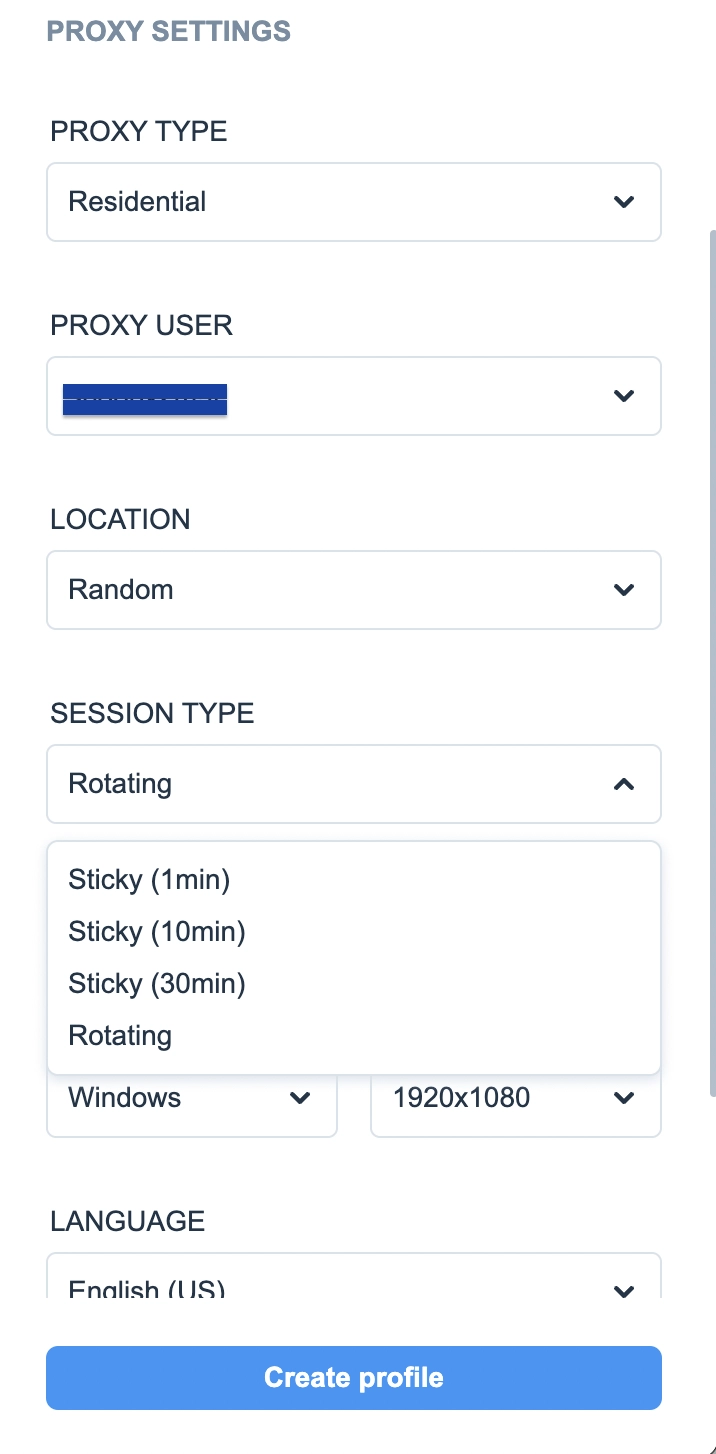
- Built-in compatibility with all proxy types: supports proxy and fingerprint configurations. All profile settings are optional, except for the proxy type and proxy user.
- Browser extensions: Chrome and Firefox extensions. Users can set up and use proxies directly in their browsers, supporting only HTTP and HTTPS.
Cons of X Browser:
- More suitable for individual use: X Browser lacks some advanced features, such as profile synchronization and cookie import/export capabilities. This makes it less ideal for complex account management tasks.
Price:
- Starting price: X-Browser is free, but you must subscribe to a proxy plan with the provider. The minimum package price for residential proxies is $6 for 2 GB.
- Free trial: 100MB free trial credits to explore X Browser.
Choose Decodo for affordable plans and built-in reliable residential IPs
Visit WebsiteAdsPower Browser’s emphasis on automation makes it highly effective for specific use cases. It is ideal for users focused on desktop-based tasks and those managing automation at scale.
Pros of AdsPower:
- No-code automation: AdsPower provides automation features, including RPA (Robotic Process Automation) and a synchronizer, for tasks such as authorizing and creating accounts, liking and commenting, and managing ad permissions. They offer pre-made templates for a range of scenarios and platforms, including Amazon, LinkedIn, YouTube, Facebook, and TikTok.
Cons of AdsPower:
- No built-in proxy: AdsPower does not supply proxies to users. If you want to use proxies, you will need to obtain them from a third-party proxy provider. The tool supports all proxy types.
- No extensions for other browsers: The extensions feature is exclusive to SunBrowser.
Price:
- Starting price: $9/month for 10+(5 free) profiles
- Free trial: It has a free version with five profiles.
GoLogin offers many of the same features as Multilogin. However, in terms of pricing, GoLogin offers nearly 100 user profiles at a lower cost, while Multilogin offers only 10, making GoLogin the more affordable option.
Pros of GoLogin:
- Mobile compatibility with Orbita Engine: GoLogin uses its Orbita browser engine, built on Chromium. This setup keeps your fingerprint protected on any device. Your browsing profiles work the same on desktop and mobile so that you can switch devices without detection risks.
- Built-in datacenter IPs: GoLogin provides free datacenter proxies, which may not perform well on sophisticated websites. You can select IP addresses from five locations: the United States, Canada, Germany, the United Kingdom, and India.
- Customizable dashboard: Users can easily add, remove, and rearrange components.
Cons of GoLogin:
- Limited free plan: While the free plan is useful for testing, it is very restrictive compared to competitors, allowing only 3 profiles.
Price:
- Starting price: $24/month for 100 profiles
- Free trial: 7-day free trial with full access to all functions
Incognito is a Chromium-based anti-detection browser that supports basic functionality for managing multiple profiles and fingerprints, including an action synchronizer and bulk creation of browser profiles. Incogniton offers a generous free plan, allowing users to save up to 10 browser profiles
Pros of Incogniton:
- Fingerprinting options: You can randomize and modify parameters such as user-agent strings, screen resolution, and language settings.
- Profile recovery: Allow users to recover multiple deleted browser profiles.
- Tools for professional teams: For managing large-scale operations, Incogniton offers a suite of features, including a profile synchronizer, cookie management tools, and paste-as-human typing.
- API support: It can be used to create and manage multiple accounts and allows integration with major browser automation tools.
Cons of Incogniton:
- Lack of custom browser: Incogniton does not offer a custom browser. This can be a disadvantage for those who need specific configurations for anti-detection purposes.
- No direct proxy provision: The provider supports all protocols like HTTP, HTTPS, and SOCKS5, but it does not provide its own proxies
Price:
- Starting price: $19.99/month for 10 profiles
- Free trial: 10 browser profiles.
Ghost Browser is a Chromium-based antidetect browser, offering privacy features such as canvas noising, scale spoofing to counteract font fingerprinting, blocking WebRTC, and tailored user agent strings to enhance user privacy.
Pros of Ghost Browser:
- Ghost Proxy Control (GPC): Extension that allows you to assign a different proxy (IP) to each tab.
- Private Data Sync capabilities: You can save your browser data to any storage solution you desire.
- Workspace for tab organization: Enables tabs to be organized into grouped collections, which is especially beneficial for social media managers working with multiple products.
Cons of Ghost Browser:
- Requires external proxy purchase: Ghost Proxy Control does not include proxies. You need to buy proxies from a proxy provider and add them to the browser extension.
Price:
- Starting price: $21/month
- Free trial: Free version
VMLogin
VMLogin establishes separate browsing environments for each social media profile, using fresh cookies. The browser also provides fingerprinting protection, preventing the collection of personal details such as IP addresses and operating system/browser information.
Pros of VMLogin:
- Visual timezone simulation: VMLogin Browser automatically adjusts based on the IP address.
- Built-in browser automation: VMLogin supports native Selenium WebDriver automation.
Pros of VMLogin:
- No proxies: The browser does not include an integrated proxy service.
Price:
- Starting price: $99/month for 200 profiles
- Free trial: 3-day trial period
Dolphin Anty
Dolphin Anty is an anti-detect browser based on the Chromium core.
Pros of Dolphin Anty:
- Profile synchronization: Dolphin{anty} allows you to manage multiple profiles simultaneously. Your actions will be duplicated across all other profiles.
- Offer customizable settings that allow users to simulate a wide range of browser and device configurations.
- Script builder: The browser automates repetitive tasks across multiple accounts by creating “scripts”.
- Dolphin{cloud}: Dolphin{anty} integrates with the Dolphin{cloud} product to automate the Facebook login process.
Cons of Dolphin Anty:
- Compatibility limitations with older operating systems: There are restrictions with older operating systems such as Windows 7/8.1 and macOS 10.15.
Price:
- Starting price: $10/month for 60 profiles
- Free trial: 10 browser profiles
MoreLogin is a multi-account management tool that automatically creates multiple profiles, each with separate cookies, sessionStorage, and localStorage. It provides an affordable entry plan with basic features.
Pros of MoreLogin:
- Cloud phone profile: This allows users to manage accounts across e-commerce and social media platforms from a virtual phone without needing physical access to a device.
- Customizable profile authorization: The profile authorization function can be customized to your needs, including Group Authorization and Browser Profile Authorization.
- Synchronization of actions: Synchronizing extension pop-ups and all mouse and keyboard actions to the controlled window.
Cons of MoreLogin:
- No proxy: MoreLogin provides proxy services only in specific countries.
Price:
- Starting price: $9/month for 10 profiles
- Free plan: 2 browser profiles
Nstbrowser, an anti-detection fingerprint browser, is mainly designed for web scraping projects. It works well with widely-used automation frameworks such as Puppeteer, Playwright, and Selenium.
Pros of Nstbrowser:
- Advanced and batch profile creation: Advanced creation (create a single profile) and batch creation (create multiple profiles at once, up to 100 profiles).
- Customizable browser fingerprints: Users can customize browser fingerprints, including language, timezone, and geolocation.
- RPA Marketplace for workflow automation: The tool includes an RPA marketplace that automates workflows, such as cookie collection and review scraping. RPA feature supports headless mode, making it suitable for web crawling and automation tasks.
Cons of Nstbrowser:
- Higher entry price: At $299, Nstbrowser is relatively expensive compared to other providers.
- No proxies: Nstbrowser does not offer its own proxies.
Price:
- Starting price: $299/month with unlimited profiles
- Free plan: Unlimited browser profiles and 1000 profile launches per day.
GeeLark combines an antidetect browser with cloud-based Android phone features so that you can manage both web and mobile accounts. It works on Windows, macOS (both Intel and Apple Silicon), and Ubuntu Linux. Cloud phone features are available for Android.
Pros of GeeLark:
- Cloud phone: GeeLark gives you real Android environments in the cloud. Each profile functions like a physical phone, with its own IMEI, MAC address, and Bluetooth, rather than merely emulating a browser.
- Mobile fingerprint authenticity: Because GeeLark runs on real Android devices, it reduces the risk of detection when using fake mobile user agents or emulators.
- Automation and synchronization tools: With the Synchronizer feature, you can repeat actions from one profile across other open profiles. This helps automate repetitive tasks, such as posting or clicking.
GeeLark also lets you use robotic process automation and templates to manage social media posts more easily.
Cons of GeeLark:
- Extra charges for cloud phones: Using cloud phones incurs additional costs for rentals and minutes, in addition to the regular subscription fee.
- GeeLark does not require its own proxy pool.
Pricing:
- Starting price: Basic plans start at about $19 per month for 50 profiles. Cloud phone rentals are charged separately, either by the day or by the minute.
- Free plan: GeeLark offers a trial with a limited number of profiles (2 profiles) and restricted cloud phone use.
Octo Browser is a standard antidetect browser for managing multiple accounts, spoofing fingerprints, automating tasks, and working with teams. It does not support mobile environments.
Octo works on Windows, macOS, and Linux, though Linux support may still be in beta.
Pros of Octo Browser:
- Bulk and template tools: Templates let you set up default fingerprints, proxies, and tags, so you can quickly create multiple profiles with the same settings.
Bulk import of proxies and mass profile creation are supported. - API and automation support: Octo provides an API with dedicated subscription plans, enabling you to manage profiles and start sessions programmatically. It works with frameworks like Puppeteer, Selenium, and CDP.
Cons of Octo Browser:
- No free plan or trial: Octo does not have a free plan or trial, so you need to choose a paid subscription to use it.
Pricing:
- Starting price: €10 per month for up to 3 profiles.
Multi-account management (Methodology)
We tested most of the anti-detect browsers on this list ourselves to see how they work in real situations. Here is what we checked:
- Multi-account management: We tested how well each browser handled multiple social media accounts simultaneously.
- Bulk account creation: We tested whether browsers could create multiple profiles with distinct browser fingerprints and manage them simultaneously.
- Automation support: We tested whether the browser could handle automated tasks such as posting, entering data, or scraping information.
- Fingerprint protection: We saw how well each browser could hide or change digital fingerprints.
Even the best anti-detect browsers can run into problems with strict anti-bot systems on sites like Amazon or LinkedIn. During testing, we sometimes faced reCAPTCHA checks or access blocks.
Are antidetect browsers the safest browsers for privacy?
Unlike open-source projects (like Tor Browser), antidetect browsers are the safest for preventing platform detection. Standard privacy browsers (like Brave or DuckDuckGo) focus on blocking cookies.
However, sites like Meta, Amazon, and Google use browser fingerprinting to identify users. Antidetect browsers use the following methods to protect users:
- Noise injection: The browser adds a layer of randomized noise to make your output look slightly different every time.
- Profile template injection: Tools like Multilogin or AdsPower use databases of real device configurations, such as user-agent and screen resolution, making you look like a common user.
Antidetect browsers vs. virtual machines (VM): Why profiles better
Browser Profiles are replacing Virtual Machines (VMs). Virtual Machine (VMware, VirtualBox) offers OS-level isolation, and websites like Amazon or Facebook can detect these virtualized drivers.
Profile solutions like anti-detect browsers mask your real hardware behind a fingerprint. If you open Chrome inside a standard VM, your Canvas Fingerprint, WebGL metadata, and AudioContext may still be identical to those of other VMs.
What is an antidetect browser?
An antidetect browser is a type of web browser that helps protect your privacy by hiding your digital fingerprint. This fingerprint includes information that websites use to recognize your device and identity.
These browsers use tools such as fingerprint spoofing, IP address spoofing, and data separation. This way, each browser profile appears to be a different user to websites.
People often use these browsers to manage multiple social media profiles, run social media advertising, and browse anonymously.
How do antidetect browsers work?
Antidetect browsers create separate virtual browser profiles, each with its own fingerprint, IP address, cookies, and operating system. This setup makes each profile appear as a different user to websites, even if they all run on the same device.
Antidetect browsers employ several techniques to achieve this separation:
- User agent randomization
- WebRTC and Canvas fingerprint masking
- Cookie and local storage separation
- Proxy integration
With these features, antidetect browsers help users manage multiple accounts, test ads, and do market research. Each activity needs a clear separation of online identities.
Why do you need antidetect browsers?
Most websites use tracking technologies, such as cookies, digital fingerprints, and web beacons, to collect information about their visitors for various purposes, including providing customized content, targeted advertising, fraud detection, and bot detection.
For instance, when you make a connection request to a website that employs web tracking technology, such as browser fingerprinting, the target server can access and collect information sent by your browser, such as your geolocation and timezone (Figure 1).
If you are located within a restricted region, the website will block your IP address to prevent you from accessing geo-restricted content.
An anti-detect browser changes your digital fingerprint parameters, such as your actual IP address, operating system, and user agents, to conceal your digital identities and circumvent IP bans.
Figure 1: An example of a browser fingerprint
Source: AmIUnique 1
FAQs about antidetect browsers
Antidetect browsers are considered legal when employed for legitimate activities, including privacy protection, advertising verification, search engine optimization testing, and management of multiple business accounts.
Some antidetect browsers have free plans or trial versions. Here are a few of the most popular choices:
GoLogin provides a free plan that supports up to three browser profiles and includes basic browser fingerprint protection.
AdsPower offers a free plan for up to five browser profiles and includes local storage.
Incogniton provides a free version for small-scale testing, allowing up to ten browser profiles.
For SEO professionals, the best antidetect browsers are those offering automation, proxy flexibility, and data isolation:
AdsPower works with automation tools like Selenium or Puppeteer, making it a good choice for tracking keywords and rankings.
GoLogin offers stable sessions and supports team collaboration, which helps with SEO testing across different locations.
If you post listings on Craigslist, OLX, or Facebook Marketplace, antidetect browsers help you follow the rules and avoid having your accounts flagged. The best options for classified ad posting include:
GeeLark is a good choice if you need a mobile setup because of its cloud phone feature for ad apps or mobile-focused platforms.
AdsPower includes automation tools to create ads and manage your accounts more easily.
Most antidetect browsers are compatible with Windows, though their performance and stability differ.
Top-rated options for Windows users are:
AdsPower is a stable desktop browser that works well on Windows 10 and 11.
Multilogin is built for Windows and offers both Chromium and Firefox engines.
Octo Browser is reliable for automation and managing multiple accounts simultaneously.
For SEO and SERP tracking, choose antidetect browsers with automation, proxy rotation, and stable profile support.
Recommended tools include:
GoLogin supports automation and streamlines team collaboration for rank tracking.
AdsPower integrates with SERP scraping tools and enables the simultaneous configuration of multiple proxies.
Octo Browser provides application programming interface (API) integration to support large-scale automated SERP verification.
Amazon sellers use antidetect browsers to manage multiple accounts and test ad visibility without cross-account detection.
Best options include:
Multilogin is a trusted solution for eCommerce and ad verification.
Octo Browser delivers realistic fingerprinting and strong proxy compatibility.
GeeLark is compatible with Android operating environments and is effective for testing mobile applications.
Reference Links




Be the first to comment
Your email address will not be published. All fields are required.