

Handwriting Recognition Benchmark: LLMs vs OCRs

OCR tools achieve over 99% accuracy on typed text in high-quality images. However, handwriting remains challenging due to variations in style, spacing, and irregularities. We introduce a cursive handwriting benchmark with 100 handwriting samples written by our team to prevent overfitting.
Cursive handwriting benchmark results
In this benchmark, GPT-5, Gemini 3 Pro Preview, and olmOCR-2-7B-1025-FP8 are the top-performing models, achieving the highest semantic similarity scores and the most consistent interpretation of cursive text across all samples.
The full names of the products are below, we shortened them in the graph. In this benchmark, their latest versions as of November/2025 are used:
- GPT-5
- Gemini 3 Pro Preview
- Gemini 2.5 Pro
- olmOCR-2-7B-1025-FP8
- Moondream OCR
- Claude Sonnet 4.5
- Nanonets-OCR2-3B
- Dots OCR
- Azure Cognitive Service
- Google Vision
- Mistral OCR
- PaddleOCR-VL
- Amazon Textract
- Deepseek OCR
Cursive handwriting benchmark methodology
For this benchmark, 10 writers handwrote 10 paragraphs each in cursive, resulting in a dataset of 100 cursive handwriting samples. Writers were not asked to write neatly. Natural letter connectivity, stroke variability, spacing distortion, and line fluidity were intentionally preserved to reflect realistic cursive complexity.
The dataset includes:
- Variable slant, stroke pressure, and ligature patterns
- Text mixed with numbers, punctuation, and capitalization
- Diverse image resolutions and backgrounds to ensure robustness
All samples were evaluated using our unified OCR assessment pipeline, based on cosine similarity for fair comparison.
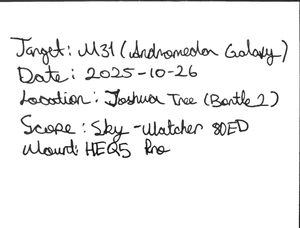
Example scanned image:
What is handwriting recognition?
Handwriting recognition, also known as handwriting OCR or cursive OCR, is a subfield of OCR technology that translates handwritten letters to corresponding digital text or commands in real time. To perform this task, these systems benefit from pattern matching to identify various styles of handwritten letters. Wikipedia defines handwriting recognition as:
The ability of a computer to receive and interpret intelligible handwritten input from sources such as paper documents, photographs, touch-screens, and other devices.
LLM handwriting recognition abilities are also highly developed, in our benchmark, gemini-3-pro is 100% accurate.
What is included in handwriting?
By handwriting, we refer to texts written in manuscript and cursive form. Texts in manuscript style are easier to recognize as the characters are written separately as block letters. However, cursive handwriting involves joined characters as they are written.
This aspect necessitates handwriting recognition tools to perceive each separate character correctly and identify them accurately. Below are examples of manuscript and cursive writing.
Source: Quora1
Handwriting recognition tools can also identify handwriting on digital screens. This kind of handwriting can be tracked as it is written. The software can leverage your dynamic motion to provide more accurate results. Below is an example of digital handwriting recognition, provided by Microsoft Azure Ink Recognizer API.
What are the challenges of converting handwriting to text?
Even though traditional OCR tools have been in the market since the 70s, there are still not many tools that can handle handwriting recognition. As everyone has their own style of writing, traditional OCR tools cannot perceive everyone’s handwriting.
Besides computer vision technology, highly complex deep learning algorithms are required to identify all these variations successfully. Below is a list of challenges that handwriting recognition tools frequently encounter:
Challenges
- Image quality: Handwritten text is often captured in low resolution or poor lighting. Pages may include stains, shadows, or smudges that act as background noise.
- Variety of writing styles: Each individual has a unique way of writing. Differences in alphabets, letter shapes, and character sizes make recognition more difficult.
- Skewed text: Handwritten lines are rarely perfectly straight. Words may tilt, curve, or even appear at unusual angles.
- Connected characters: In cursive or fast writing, letters and symbols often join together, making them harder to separate.
- Degradation: Older or heavily used documents can have faded ink, yellowing, or page damage, reducing text clarity.
Solutions
Modern HTR tools combine computer vision with deep learning to overcome these challenges. These approaches go beyond traditional OCR, which has been around since the 1970s but still struggles with handwriting. Today, progress is being made through:
- Improve input quality: Capture or scan documents at higher resolution and better lighting.
- Background cleaning: Use machine learning or photography techniques to remove noise and improve clarity.
- Advanced recognition algorithms: Apply deep learning models designed to handle varied writing styles, alphabets, and connected letters.
- Skew correction: Use image-processing tools to detect and correct tilted or rotated text.
- OCR-friendly design: When possible, create forms and documents that are easy for OCR tools to process.
Preparation for converting handwritten notes
There are a variety of factors to consider while designing documents. The most important one is the data to be captured from documents. As there are different ways to represent the same type of data, you need to consider the speed, accuracy, and user-friendliness of each option while constructing your document.2 ,3 ,4
1. Scanning and preprocessing
- Ensure a clear scan: Use a scanner or a dedicated app to create a high-resolution, well-lit image of your notes.
- Binarization: Convert the scanned image to black and white to improve contrast and make the text more distinct from the background.
Source: Datacap.hk
- Noise removal & skew correction: Apply filters to remove any stray marks or shadows and correct any tilt in the document. Avoid colorful backgrounds. Benefit from alignment elements to prevent skewed documents.
2. Segmentation techniques
Segmentation is the process of breaking down the image into smaller, more manageable components, such as text lines, words, and individual characters. To ensure that, businesses can use segmentation methods, which you can see below.
Source: How OCR Works5
- Text line segmentation: This is a prerequisite for other tasks and involves separating the document into individual lines of text. Keep data within the margins.
- Word and character segmentation: After line segmentation, you can further divide the lines into individual words and then characters, which is crucial for accurate text recognition.
- Utilizing advanced AI tools: AI-powered tools like Transkribus can perform sophisticated text and layout segmentation automatically for complex notes.
3. Incorporating checkboxes for easier digitization
- Pre-printed boxes: If you know you’ll be digitizing your notes, draw or print checkboxes clearly on the page, ensuring they are large enough to be easily recognized by OCR software.
- Clear formatting: Make sure checkboxes are not too close to the text they are associated with and have sufficient contrast with the paper.
- Leverage AI-powered OCR: Tools can be trained to recognize these checkboxes, allowing for easier processing and extraction of checked/unchecked information.
- Standardize: Use the same type of checkbox and style throughout your notes for consistency.
4. Using OCR software
- Apply OCR: Once the notes are scanned and segmented, use Optical Character Recognition (OCR) software to convert the images of the text into machine-readable digital text.
- Post-processing: Review the digitized text for errors, especially in areas with complex handwriting or unusual layouts.
Is there active research on handwriting recognition?
As handwriting recognition capability highly depends on neural networks, advances in these algorithms profoundly affect the performance of handwriting recognition tools. Thus, active research on handwriting recognition is generally based on neural network algorithms.
Google’s research on handwriting recognition starts with several training steps:
- Introduction of all possible characters from different alphabets
- Training the tool for segmenting each character in a text
- Training the tool for feature extraction for accurate character identification
Google is also using language processing algorithms to improve handwriting recognition performance. For example, if the tool needs to decide between “i” and “l,” it can analyze the whole word and decide on the suitable character to provide accurate results.
OCR software usually has several handwriting recognition engines integrated into the software. These engines work synchronously to generate the most accurate character representation corresponding to the input.
Handwriting recognition vendors
As handwriting recognition is a subfield of OCR, the criteria for choosing the proper handwriting recognition are similar to those of OCR tools. While selecting a handwriting recognition vendor, you should consider the following factors:
- Character recognition accuracy
- Continuous learning capabilities
- Computation speed in case results need to be delivered in real-time
- User-friendliness of the interface, if the interface will be used by humans
In addition to these, procurement best practices such as ensuring minimum Total Cost of Ownership (TCO), flexibility, data security best practices, and avoiding vendor lock-in are essential.
Below you can find a short list of handwriting vendors. You should also keep in mind that these vendors can also provide OCR services for your business.
- Abbyy
- Google Cloud Vision API
- Hanvon Technology
- Hanwang Technology
- Infrrd.ai
- MicroBlink
- Microsoft Azure Read API
- Mitek
- MyScript
- Selvasai
- Unitek.ai
- Vidado
FAQ
Use a cursive reader or handwriting recognition software to help decipher illegible handwriting
Straighten and flatten paper notes to prevent skewing or distortion, and get as high-quality scanned documents as possible
Use optical character recognition (OCR) software to convert scanned images or photographs of handwritten text.
Export converted digital text to PDF files or other formats for sharing or storage
Look for features such as character recognition, digital ink, and block letters support
If you want to read more about handwriting recognition tools, these articles can also interest you:
- Current State of OCR: Is It a Solved Problem?
- Invoice OCR Benchmark: Extraction Accuracy of LLMs vs OCRs
Reference Links
Cem's work has been cited by leading global publications including Business Insider, Forbes, Washington Post, global firms like Deloitte, HPE and NGOs like World Economic Forum and supranational organizations like European Commission. You can see more reputable companies and resources that referenced AIMultiple.
Throughout his career, Cem served as a tech consultant, tech buyer and tech entrepreneur. He advised enterprises on their technology decisions at McKinsey & Company and Altman Solon for more than a decade. He also published a McKinsey report on digitalization.
He led technology strategy and procurement of a telco while reporting to the CEO. He has also led commercial growth of deep tech company Hypatos that reached a 7 digit annual recurring revenue and a 9 digit valuation from 0 within 2 years. Cem's work in Hypatos was covered by leading technology publications like TechCrunch and Business Insider.
Cem regularly speaks at international technology conferences. He graduated from Bogazici University as a computer engineer and holds an MBA from Columbia Business School.






Comments 4
Share Your Thoughts
Your email address will not be published. All fields are required.
Exactly what I was looking for. Thank you!
Hi Cem, your article is very clear and practical. Thank you for sharing your knowledge! It will be very useful for me.
See Transkribus from readcoop for handwritten text recognition for cursive writing.
Which service or software would you recommend in this case: - manuscript/diary 100s of pages written by one author - other language than English (German in this case) I need the software to learn my handwriting, that is not in English and preferably with a good tool to correct all the error.
Thank you for reaching out. You can try Google Cloud Vision. It is not bad at handwriting recognition and is free to try. I don't know if it can get user feedback to improve its models. Let us know if you find that functionality.