

Moltbot (Formerly Clawdbot) Use Cases and Security [2026]

Moltbot (formerly Clawdbot) is an open-source, self-hosted AI assistant designed to execute local computing tasks and interface with users through standard messaging platforms. Unlike traditional chatbots that function as advisors generating text, Moltbot operates as an autonomous agent that can execute shell commands, manage files, and automate browser operations on the host machine.
By early 2026, Moltbot had surpassed 60,000 GitHub stars, driven by its privacy-first architecture and proactive capabilities. See how Moltbot works through hands-on deployment, its architecture, real-world use cases, and security risks:
Hands-on evaluation of Moltbot
To evaluate Moltbot beyond documentation, we deployed it on a CPU on Runpod with Ubuntu 24.04 and tested it with a set of practical, everyday automation tasks using a messaging-based workflow.
File organization and system automation
We tested Moltbot’s ability to perform file system operations by instructing it to create and organize folders within a downloads directory. The agent successfully created synthetic directories, classified files by type, and moved them to the appropriate locations using shell-level commands. These operations were executed reliably without requiring an active terminal session once the agent was running.
Receipt processing and spreadsheet generation
To assess document understanding and file generation, we provided Moltbot with an image of a grocery receipt and asked it to add the contents to a spreadsheet. The agent extracted the items, structured them in tabular form, and generated a spreadsheet. Upon request, it could also return the resulting .xlsx file directly through the messaging interface.
This test showed that Moltbot can extract data, structure it, and save files in a single workflow.
Proactive monitoring and notifications
We also tested Moltbot’s proactive capabilities by configuring it to monitor a directory and notify us when a specific file appeared. Once the trigger condition was met, the agent initiated contact without prompting the user, sent a notification, and executed the predefined follow-up action.
This behavior confirmed that Moltbot can function as an always-on background agent, capable of initiating actions and communicating in response to events rather than just responding to direct commands.
Overall observations
Across these tests, Moltbot performed reliably for lightweight, recurring tasks such as file organization, simple data processing, and event-based notifications. Basic setup was straightforward, but enabling complex workflows required configuring multiple external services and API keys. Some integrations demand broad permissions, which increases setup time and raises security considerations.
This means that Moltbot is easy to start with for basic automation, but fully operational deployments require detailed configuration and careful permission management.


How Moltbot can be used in practice
While the previous section summarizes our hands-on evaluation, the following outlines how Moltbot is typically positioned and used in real-world deployments.
Moltbot is not a consumer assistant designed for ad-hoc personal tasks. In practice, it functions as a remote operational layer for machines that require continuous, lightweight automation without a graphical interface.
Core interaction model
Once deployed, Moltbot operates via message-driven commands rather than interactive sessions. Users communicate with the agent via messaging platforms such as Telegram, WhatsApp, or other channels Moltbot supports, while execution occurs on the host machine.
This design enables three practical usage patterns:
- Remote system operations
Users can manage files, run scripts, or query system state without logging into the machine. For example, organizing directories, triggering batch jobs, or checking disk usage can be done from a mobile device. - Scheduled and conditional automation
With cron integration and its heartbeat mechanism, Moltbot can independently monitor conditions and respond without explicit prompts. This includes tasks like checking server uptime, monitoring log files, or tracking threshold-based metrics such as stock prices or API status. - Delegated task execution
Moltbot can serve as an execution proxy for specific workflows, such as managing incoming emails, updating folders, or posting predefined content to social media platforms, as long as the necessary skills and permissions are enabled.
Skills as the true control layer
Unlike visual computer-use agents, Moltbot’s capabilities depend on the enabled skills. These skills govern what the agent can and cannot do, such as:
- File system access
- Browser automation
- Email or calendar integration
- External API interaction
Without these skills, the agent has no operational power. As a result, the security and reliability of a Moltbot deployment depend less on prompt quality and more on permission design.
Early-stage adoption considerations
At its current maturity, Moltbot is best suited for:
- Secondary machines, servers, or sandboxed environments
- Accounts created specifically for automation purposes
- Non-critical workflows where failure modes are acceptable
Using Moltbot with high-value personal accounts or production systems requires careful isolation and monitoring.
Is Moltbot safe to use?
Moltbot’s security profile depends equally on deployment choices and model behavior. While its documentation emphasizes safe command execution and ethical constraints, real-world risk primarily emerges from network exposure and permission scope.
Exposed gateway and remote takeover risk
By default, Moltbot’s gateway is bound to the local loopback interface, limiting access to the host machine. However, some users reconfigure the gateway to bind to a public or non-loopback interface in order to access the agent remotely.
When this occurs, multiple internal services and ports may become externally reachable. In such configurations, attackers can interact with the agent’s control surface over the network.
If users expose the gateway without strong authentication and network controls, Moltbot effectively becomes a remote command execution interface. An attacker could issue commands, access files, or manipulate the host system, resulting in full machine compromise.
This risk is independent of large language model behavior and applies even if the agent strictly follows its internal safety rules.
Agent-level risks (LLM and workflow related)
In addition to infrastructure risks, Moltbot inherits the standard failure modes of autonomous agents:
- Ambiguous command interpretation: Shell access enables strong actions. Misinterpreted instructions may lead to unintended file deletion or system changes.
- Prompt injection through trusted inputs: If the agent processes emails, documents, or web content, malicious instructions embedded in those inputs could influence its behavior.
- Third-party skill execution: Skills extend functionality but also expand the attack surface. A poorly designed or malicious skill can introduce vulnerabilities or leak credentials.
Data exposure via external APIs
Although Moltbot executes locally, it relies on external model providers for reasoning. Prompts and selected file snippets may be transmitted to third-party APIs, potentially exposing sensitive data to the outside world depending on configuration.
Practical security guidance
At its current maturity, Moltbot should be treated as privileged automation infrastructure instead of a consumer assistant.
Best practices include:
- Keeping the gateway bound to loopback unless protected by VPNs or firewalls
- Avoiding public exposure of agent endpoints
- Running Moltbot on isolated machines or low-privilege accounts
- Limiting enabled skills to the minimum required
- Monitoring logs for unexpected command execution
Failure to apply these controls shifts the risk from “AI error” to traditional remote system compromise.
What is Moltbot?
Moltbot acts as a bridge between Large Language Models (LLMs) and a user’s local operating system. While it uses external model APIs or local models for reasoning, the execution environment remains entirely on the user’s hardware.
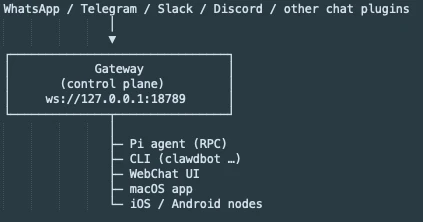
The system architecture consists of four primary components:
- The gateway: A background service acting as the front door. Managing connections to messaging platforms.
- The agent: The reasoning engine (LLM) that interprets intent.
- Skills: Modular capabilities that extend the agent’s reach, such as browser automation (via Puppeteer), file system access, calendar integration, etc.
- Memory: A persistent storage layer (often utilizing Markdown files) that retains context, preferences, and long-term conversation history.
What makes moltbot unique?
To understand why Moltbot gained attention, it helps to compare it with two common agent designs: visual agents and CLI tools. Other agents try to simulate human interaction or assist with coding. Moltbot runs as a headless background service, which changes how the agent operates.
Moltbot vs. Visual Agents
The industry standard for computer use relies on visual grounding. These agents take screenshots, process pixel data using vision-language models (VLMs), and calculate coordinates to simulate mouse clicks.
- Visual agent approach: They face a grounding bottleneck. Computer use agents are still struggling with dense interfaces, and visual processing introduces high latency and the potential for pixel misalignment errors.
- The Moltbot approach: Moltbot is headless, meaning it bypasses the graphical user interface (GUI) entirely. It does not look at a file icon to move it; it executes a system shell command (e.g., mv /downloads/*.pdf /documents).
As a result, by replacing visual inference with direct code execution, Moltbot eliminates grounding errors and operates at machine speed rather than human interface speed.
Moltbot vs. CLI agents
Tools such as Claude Code or Open Interpreter act as interactive utilities. They run within a terminal window and respond only when the user inputs a command. These tools function as reactive co-pilots.
- CLI agent approach: CLI agents suffer from session amnesia. Once you close the terminal window, the agent stops running, and context is often lost. They require the user to be physically present at the machine.
- The Moltbot approach: Moltbot runs as a gateway daemon (background service) on a local server or VPS. It persists 24/7, maintaining long-term memory in local files (e.g., MEMORY.md).
As a result, you do not need to be at your computer. You can text your agent from a mobile device via Telegram, WhatsApp, or other channels Moltbot supports to execute tasks on your home server, and the agent retains context across weeks of interaction.
A key difference is that Moltbot can initiate interaction. Traditional CLI and visual agents wait for a user prompt (Reactive). Moltbot features a Heartbeat Engine and cron job integration that allows it to be Proactive.
- Instead of you asking “Is the server down?” or “Did the stock price drop?”, Moltbot wakes itself up, checks the data, and messages you if a threshold is met.
Architectural comparison matrix
This comparison shows that Moltbot prioritizes persistence and automation speed over human-like interaction. Its design trades visual grounding and interactive safety for lower latency and always-on execution.
Cem's work has been cited by leading global publications including Business Insider, Forbes, Washington Post, global firms like Deloitte, HPE and NGOs like World Economic Forum and supranational organizations like European Commission. You can see more reputable companies and resources that referenced AIMultiple.
Throughout his career, Cem served as a tech consultant, tech buyer and tech entrepreneur. He advised enterprises on their technology decisions at McKinsey & Company and Altman Solon for more than a decade. He also published a McKinsey report on digitalization.
He led technology strategy and procurement of a telco while reporting to the CEO. He has also led commercial growth of deep tech company Hypatos that reached a 7 digit annual recurring revenue and a 9 digit valuation from 0 within 2 years. Cem's work in Hypatos was covered by leading technology publications like TechCrunch and Business Insider.
Cem regularly speaks at international technology conferences. He graduated from Bogazici University as a computer engineer and holds an MBA from Columbia Business School.




Be the first to comment
Your email address will not be published. All fields are required.