

How to Use SOCKS5 Proxy: Setup for Mac, Windows, & Mobile

If you have tried entering your SOCKS5 details into your iPhone or Android settings and found that your internet stopped working, you are not alone. In 2026, mobile OS security and the shift to Manifest V3 browser standards have changed how we manage proxies.
Pro tip: Before you start, ensure your proxy speed isn’t the bottleneck. Our SOCKS5 proxy benchmark shows that Bright Data is the fastest choice, while Decodo offers the best value per GB.
1. How to Use SOCKS5 Proxy on macOS
- Open the “Apple Menu” and go to “System Preferences“, and click on “Network” in the sidebar.
2. Select the network service you are currently using (e.g., Wi-Fi) and click the “Advanced” button.
3. From the menu, go to the “Proxies” tab.
- Find the “SOCKS Proxy” and toggle it ON (as shown in the image).
- In the long box on the right side, enter the Hostname (e.g., pr.oxylabs.io) provided by your proxy provider.
- In the small box after the colon (:), enter the Port Number (e.g., 1080).
- If your proxy server uses User/Pass authentication, check the box labeled “Proxy server requires password“. Enter the Username and Password given by your provider.
- Save: Click OK to apply the proxy server details.
2. How to set up SOCKS5 proxy on Windows
- Open “Settings” and go to “System” from the dropdown menu.
- Click “Open your computer’s proxy settings“.
3. Go to “Network & Internet” and enable the use of a proxy by toggling this switch to On.
4. Enter the SOCKS5 server IP provided by your proxy service, and enter the port number.
3. How to use SOCKS5 proxy on iOS & Android
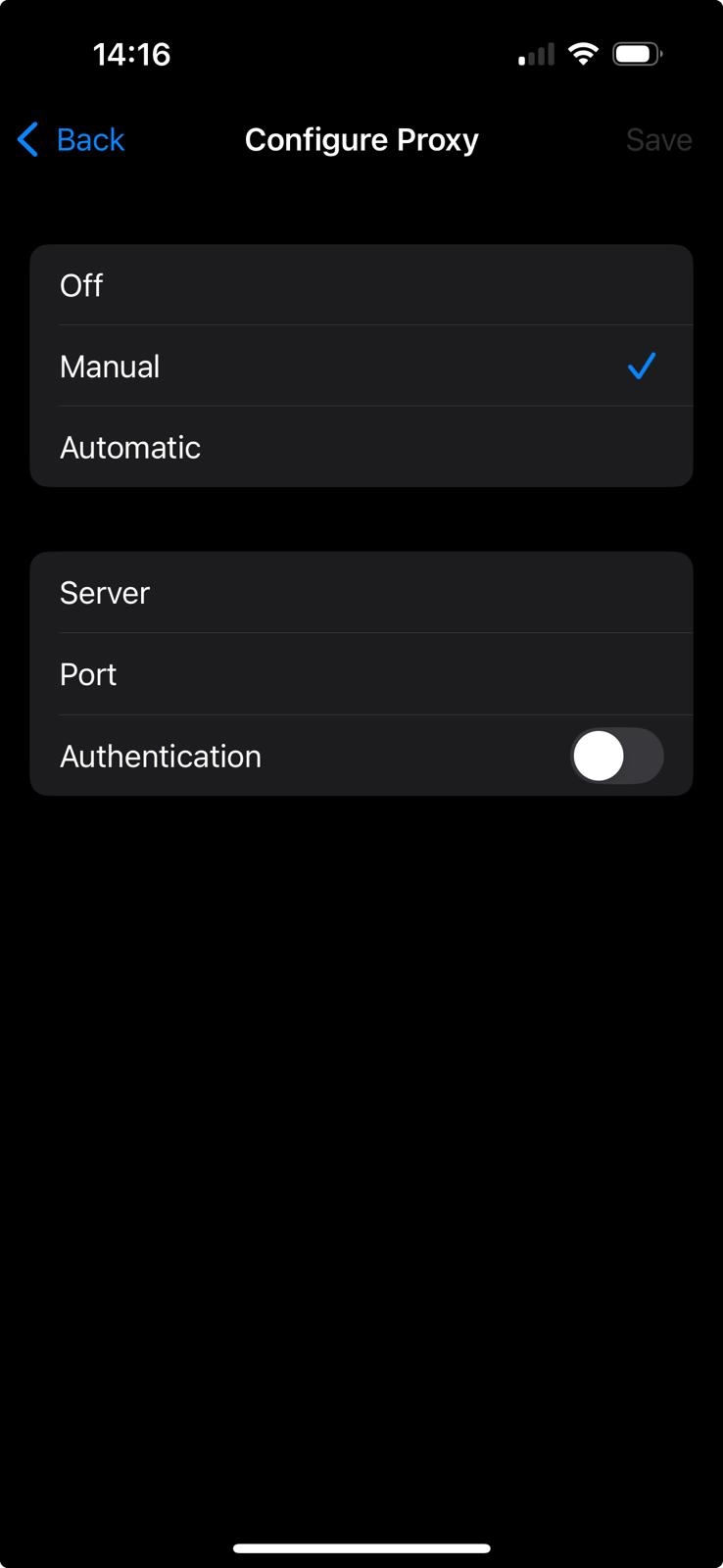
iOS and Android lacked native SOCKS5 support in their Wi-Fi settings, defaulting to HTTP. Many top providers (Bright Data, Oxylabs, SOAX) now offer Auto-Config Profiles.
If your provider doesn’t offer a profile, you can follow the following steps:
4. How to use SOCKS5 proxy only in your browser
For Firefox (native support):
Firefox is distinctive in that it is among the few browsers that support native SOCKS5 proxy configuration, independent of Windows settings.
- Go to Settings > General and scroll to the bottom.
- Click Settings under Network Settings.
3. Select Manual proxy configuration.
4. Enter your IP and Port in the SOCKS Host field.
For Chrome, Edge, and Brave
Use ZeroOmega, the successor to SwitchyOmega and compliant with Manifest V3, to manage and switch between multiple proxies.
- Install ZeroOmega from the Chrome Web Store.
- Open Options and create a Proxy Profile.
- Choose SOCKS5 as the protocol.
- Enter your server address and port.
SOCKS5 for AI agents (MCP)
If you are using AI agents (like Claude Code or AutoGPT) for web research, you can now connect them directly to your SOCKS5 environment.
This allows AI agents to bypass bot detection by autonomously using residential SOCKS5 IPs. For example, Proxyman (proxy app) supports the model context protocol (MCP).
To configure a native MCP Server in Proxyman 6.4.0, open the Settings or Tools menu and enable the “Enable MCP Server option. In Proxy Settings, enter your SOCKS5 credentials. Next, direct your AI agent to Proxyman’s local MCP endpoint.
FAQs about SOCKS5 proxy usage



Be the first to comment
Your email address will not be published. All fields are required.